All in Agent: Integrating Workflows into the Agent
In the Agent era, the default entry point for operations is no longer the platform UI, but the Agent itself.
The Problem: Agents Are Strong in the IDE, Helpless Outside
Agents can write code, but they can’t complete a full development workflow.
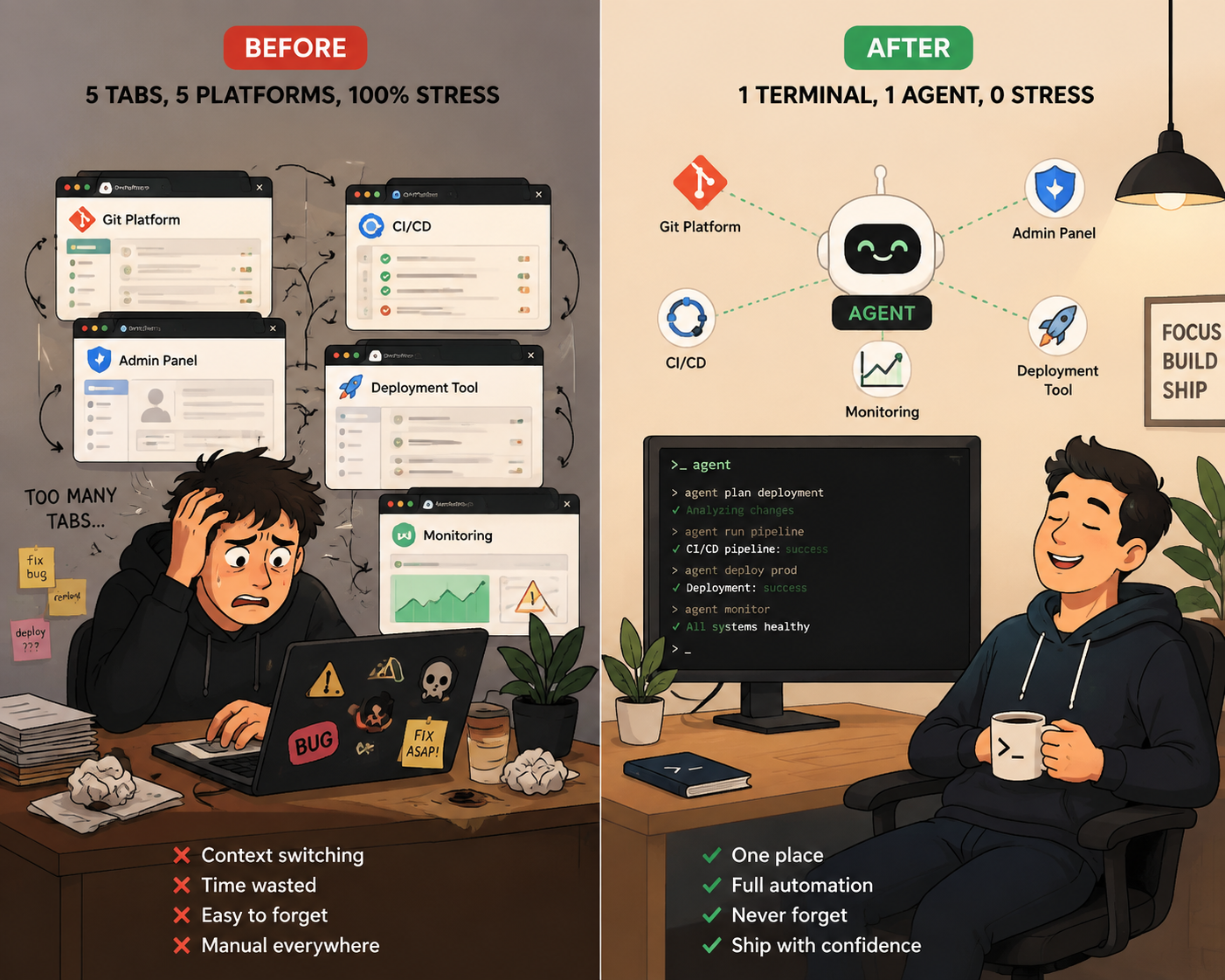
Picture this: fixing a bug. The Agent locates the problem in the IDE, modifies the code — that part is fast. Then what? Manually open the Git hosting platform to create a merge request, manually open the CI/CD platform to trigger a build, manually open the admin console to check configurations, manually open the release platform to publish. The Agent is strong at “writing code,” but becomes helpless once it leaves the IDE.
But this problem isn’t just for developers.
Operations staff configuring a campaign need to create templates in the campaign management platform, find assets in the design platform, configure launches in the release platform, and monitor data in the analytics platform. Each platform requires opening, logging in, finding the right page, clicking buttons. Tedious, repetitive, error-prone.
Product managers face the same issue: writing requirements in the requirements platform, reviewing designs in the review platform, checking metrics in the analytics platform, tracking progress in the project management platform. Information is scattered across platforms, and every context switch is a loss of focus.
This isn’t an Agent problem — it’s a system design problem. These platforms were designed only for human users. Nobody thought, “If an Agent needs to call me, how should I expose my interface?”
Two Meanings of “All in Agent”
First, wrap platform operations into tools that Agents can call. Not give the Agent a browser and let it click around — give it a unified interface so it can operate directly.
Second, orchestrate workflows into executable processes that Agents can run. Not let the Agent freestyle — define the steps and gates so it executes according to the process.
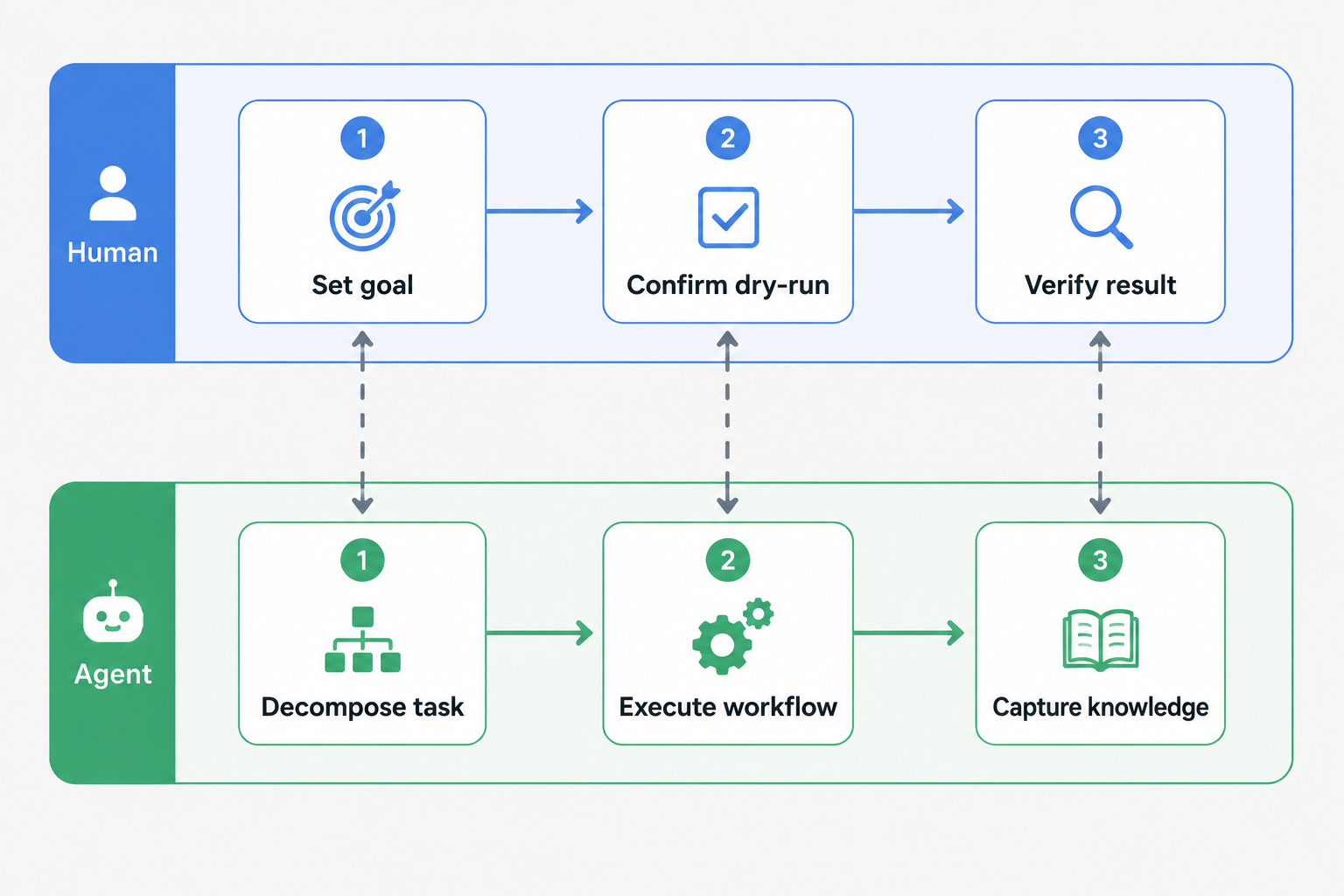
Once you achieve these two points, regardless of role, the way of working becomes: I tell the Agent the goal, the Agent goes from start to finish, I make judgments and accept results at key checkpoints.
Wrapping Platform Operations into Tools
CLI Is the Most Direct Bridge
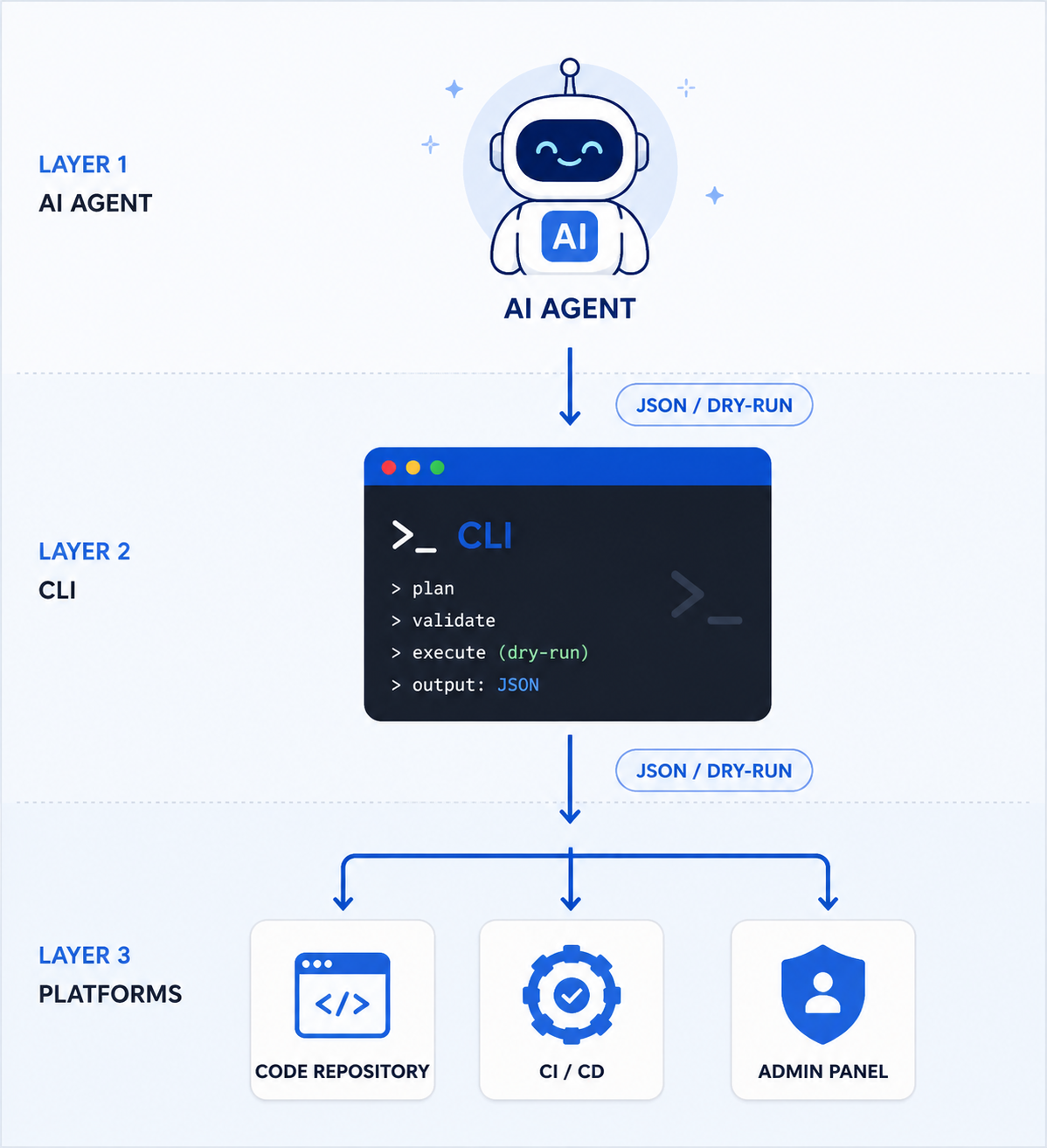
Wrapping platform operations into tools — the most direct way is CLI.
CLI has natural properties that suit Agents: structured output (JSON) that Agents can parse directly; idempotent operations that Agents can safely retry; pipe composition that’s suitable for orchestration; no GUI dependencies, pure text interaction; auditable, with logs for every operation.
But many CLIs are built for humans — output is colorful tables, parameters have interactive prompts, error messages hide in fancy formatting. To make them Agent-callable, two things are enough: default to JSON output, provide a dry-run mode.
Scenario 1: Developer’s Release Process
The traditional approach is opening the Git platform to create an MR, opening the CI/CD platform to trigger a build, opening the release platform to select a version. After wrapping into CLI:
$ release start --branch feat/fix-bug --dry-run
→ Output: About to create MR, version v1.2.3, change list [src/a.ts, src/b.ts]
→ Human confirms: yes

$ release start --branch feat/fix-bug
→ Auto-create MR → Wait for CI to pass → Trigger build → Release
Scenario 2: Operations Campaign Configuration
The traditional approach is opening the admin console to create a campaign, finding assets in the design platform, configuring launch in the release platform, monitoring data in the analytics platform. After wrapping into CLI:
$ campaign create --template spring-festival --dry-run
→ Output: About to create campaign, linked assets [banner.png, prize-list.json], channels [homepage popup, push notification]
→ Human confirms: yes

$ campaign create --template spring-festival
→ Auto-create campaign → Bind assets → Configure delivery → Go live

$ campaign status --id 123
→ Output: Campaign status, impressions, click-through rate
How to Do It: Key Design Points
Unified Authentication
Every platform has its own login method. Git platforms need SSH keys or tokens, CI/CD platforms need API tokens, admin consoles need SSO. For Agents to call them, you can’t configure a separate authentication system for each platform.
The approach is a unified authentication entry point. CLI provides a one-time login command. After the user completes authentication via SSO, credentials are stored locally and automatically reused for all subsequent operations. The Agent doesn’t need to know how many authentication methods exist behind the scenes — it just calls the CLI, and the CLI handles authentication.
Two-Stage Writes: Preview First, Then Execute
This is the most critical safety design. Any write operation is split into two steps:
$ cli action do-something --dry-run --json
→ Output: Operation about to execute, changes, impact scope
→ Human confirms: yes

$ cli action do-something --confirm
→ Actually execute
--dry-run outputs structured JSON that Agents can use for pre-checks and humans can use for judgment. --confirm is the actual execution. The benefit of this pattern: Agents can automatically run dry-run for validation, but write operations must wait for human confirmation.
Structured Output
CLI defaults to JSON output, not colorful tables. JSON can be directly parsed by Agents and processed by toolchains like jq. When humans want a readable format, add the --pretty parameter.
Audit Logs
Every operation is automatically recorded: who operated, when, what command was called, and the result. Logs are written to local files in JSON Lines format, naturally supporting tail -f for real-time viewing and grep for searching. Agents can also query audit logs for retrospectives.
Organize Commands by Domain
CLI organizes commands by domain in layers, rather than flattening all operations at one level:
$ cli auth login              # Authentication
$ cli git mr create           # Git operations
$ cli ci build trigger        # CI/CD operations
$ cli deploy start            # Release operations
$ cli config set              # Configuration management
Each domain has its own command group, non-interfering. Agents can load only the command documentation for relevant domains based on task needs, without stuffing all commands into context.
Skill Templates
Each domain, besides CLI commands, includes an operation guide telling Agents what commands are available, when to use which commands, and what to watch out for. Agents read the corresponding guide when needed and don’t load it when not needed.
Orchestrating Workflows into Executable Processes
From “Can Call” to “Can Orchestrate”
CLI solves “Agent can call platforms,” but that’s not enough. The Agent also needs to know when to call what.
Defining executable workflows isn’t letting the Agent freestyle:
1. Preparation phase → Gate: Assets ready, copy approved
2. Create campaign → Gate: No duplicate configs, budget within limit
3. Configure delivery → Gate: Target users correct, push timing reasonable
4. Go-live verification → Gate: Preview normal, data metrics correct
Each step corresponds to a CLI command, gates are the command’s validation logic. Where it’s stuck and why is clear at a glance.
Human-Agent Collaboration
Workflow orchestration doesn’t equal automation. Key checkpoints need human judgment:
| Checkpoint | Human Responsibility | Agent Responsibility |
|---|---|---|
| Requirement understanding | Confirm goals | Retrieve context, break down tasks |
| Execution | Confirm dry-run results | Execute operation flow |
| Verification | Confirm results meet expectations | Check gate rules |
| Retrospective | Analyze root causes | Archive records to knowledge base |
Humans shift from executors to decision-makers, energy moves from “doing” to “judging.”
Three Design Principles
Principle 1: Agent-First, Human-Compatible
When designing systems, first ask how the Agent uses it, then ask how humans use it. CLI defaults to JSON output, while providing --pretty for humans. Operations default to dry-run, while providing --yes to skip confirmation. Error messages have both machine-readable error codes and human-readable descriptions.
Principle 2: Constraints in Tools, Not in Prompts
Don’t write “don’t delete live campaign configs” in the prompt — the Agent might ignore it. Directly prohibit high-risk operations in the CLI tool, or require double confirmation. Having a non-existent tool block it is more effective than writing ten “prohibited” statements. (One of the core insights in Pi’s design philosophy — constraints written into tool APIs, not into prompts.)
Principle 3: Low-Frequency Capabilities Not Resident
Agent context windows are scarce resources. High-frequency capabilities (code generation, campaign creation) are available by default, low-frequency capabilities (releases, config changes) are loaded on demand, reading operation instructions only when needed.
When It’s Not Suitable
All in Agent isn’t a panacea. Some scenarios aren’t suitable:
- Small tasks, one-time operations — Things a single prompt can handle don’t need a system
- Platforms without APIs or CLIs — No programmatic interface, Agent can’t integrate
- High-risk operations — Deleting databases, changing core configs, keep manual channels
- Teams without a “writing” habit — This system depends on people continuously maintaining workflows and knowledge bases
Summary
All in Agent isn’t “using Agent to write code,” it’s migrating the entry point for various operations from platform UIs to the Agent itself. CLI is the key bridge to achieve this goal — it turns platform operations into tools Agents can call, turns workflows into processes Agents can execute.
The final state is: Humans set goals, make judgments; Agents run processes, do execution.
References
- Pi author Mario Zechner’s blog — Light Harness philosophy: constraints in tools, not in prompts